MkDocs Installation 
 This Page is fully written with Markdown Language and converted to HTML
Material for MkDocs Markdown 
This website is built with MkDocs. MkDocs is a static site generator that can be used to generate websites with a clean and simple user interface. It is a free and open source project.
Warning
Most of the advanced features used to generate this website and the Markdown syntax used from Material Theme for MkDocs and may not apply to other websites.
Prerequisites 
- Visual Studio Code
- Git
on Windows 
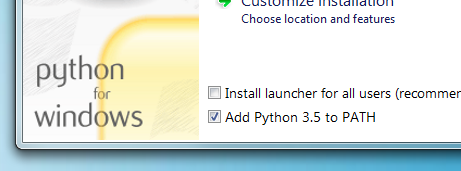
Step 1: Install Python using your package manager of choice, or by downloading an installer from python.org. 
Be sure to check the box to have Python added to your PATH if the installer offers such an option (it's normally off by default).
Step 2: Install mkdocs using pip 
pip install mkdocs
Step 3: Install mkdocs plugins using pip 
pip install mkdocs-material
pip install mkdocs-awesome-pages-plugin
pip install mkdocs-blogging-plugin
pip install mkdocs-include-dir-to-nav
on Mac 
Step 1: Verify the brew installation 
brew --version
Step 2: Change the folder permission to install python, if needed 
sudo chown -R $(whoami) /usr/local/lib/pkgconfig
chmod u+w /usr/local/lib/pkgconfig
Step 3: Install python3 
brew install python3
Step 4: Install mkdocs 
pip3 install mkdocs
Step 4: Install mkdocs plugins 
pip3 install mkdocs-material
pip3 install mkdocs-awesome-pages-plugin
pip3 install mkdocs-blogging-plugin
pip install mkdocs-include-dir-to-nav